I was trying to use GPU instancing following this example:
https://playcanvas.vercel.app/#/graphics/instancing-glb
When using the Editor, I found two issues that appear to be bugs.
1. .glb imported via Editor loses extensionsUsed and instancing attributes
When I upload a .glb in the Editor, the resulting container asset loses the extensionsUsed metadata (EXT_mesh_gpu_instancing) and related attributes.
However, if I rename the same file (e.g., .glb.copy), upload it as a binary and load it manually, the instancing extension is preserved.
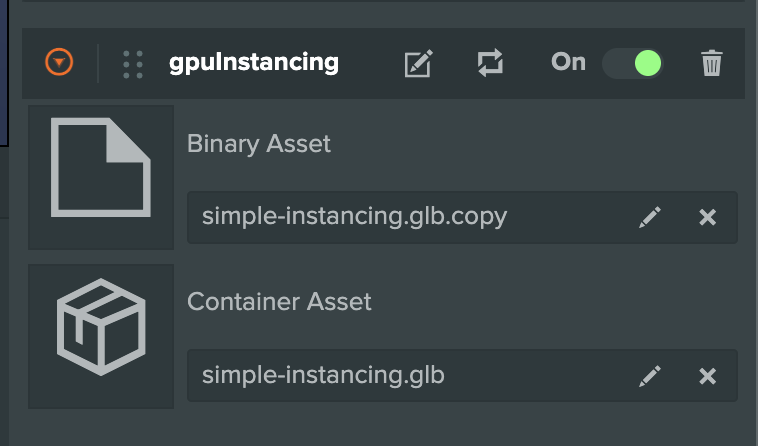

Container Asset:
extensionsUsed: undefined

Binary Asset:
extensionsUsed: ['EXT_mesh_gpu_instancing']
So the data is present in the GLB, but removed by the Editor’s conversion pipeline.
2. asset.getFileUrl() returns incorrect path in Launch mode (extra /api/)
Because of issue 1, I load the GLB manually from URL.
However, in Launch Preview, asset.getFileUrl() generates a URL that contains "/api/", which causes the load to fail. I have to manually slice it out:
// Workaround
const url = asset.getFileUrl().slice(5);
This only happens in Launch.
In bundled builds, the returned path is correct.
Code
initialize() {
    this.loadGlbContainer(this.binaryAsset, this.app);
    console.log('Container Asset:', this.containerAsset.resource.data.gltf);
}

loadGlbContainer(asset, app) {
    const assetUrl = asset.getFileUrl();

    // getFileUrl() contains extra "/api/" in Launch mode
    const url = assetUrl.slice(5);

    const sourceAsset = new pc.Asset(asset.name, 'container', { url });
    app.assets.add(sourceAsset);

    sourceAsset.once('load', () => {
        console.log('Binary Asset:', sourceAsset.resource.data.gltf);
        const gltfEntity = sourceAsset.resource.instantiateRenderEntity();
        this.entity.addChild(gltfEntity);
    });

    app.assets.load(sourceAsset);
}
Project Link: PlayCanvas | HTML5 Game Engine